Projects / AI, Data Science
OMC Production Assistant Bot
AI-Powered OEE Analytics Chatbot for Manufacturing Intelligence.
Project Overview
OMC Production Assistant Bot is an enterprise-grade AI-powered OEE (Overall Equipment Effectiveness) analytics chatbot built for manufacturing intelligence. The system enables factory operators and managers to query production data using plain natural language — no SQL knowledge required — and receive structured answers, performance summaries, and on-demand visualizations.
The bot connects to a SQL Server database containing OEE metrics, machine availability, performance, quality, downtime, and operator activity data. Its autonomous agent can dynamically explore any table and column in the database by writing its own SQL queries, making it highly flexible without being locked into predefined data structures.
Problem Statement
Manufacturing environments generate large volumes of production data (OEE, FHO, MTBF, MTTR) typically locked inside databases accessible only to engineers with SQL knowledge. Operators and managers must wait for manual reports, leading to:
- Slow decision-making — delayed access to real-time performance insights.
- Knowledge barriers — non-technical users cannot self-serve production data.
- Scalability issues — manual reporting does not scale across multiple shifts, machines, or product lines.
A conversational AI interface was needed to democratize access to manufacturing data with natural language, real-time responses, and smart visualizations.
System Architecture
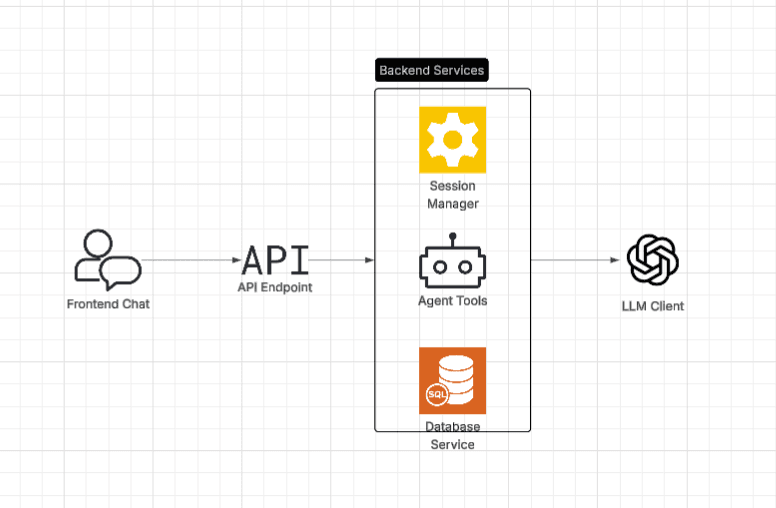
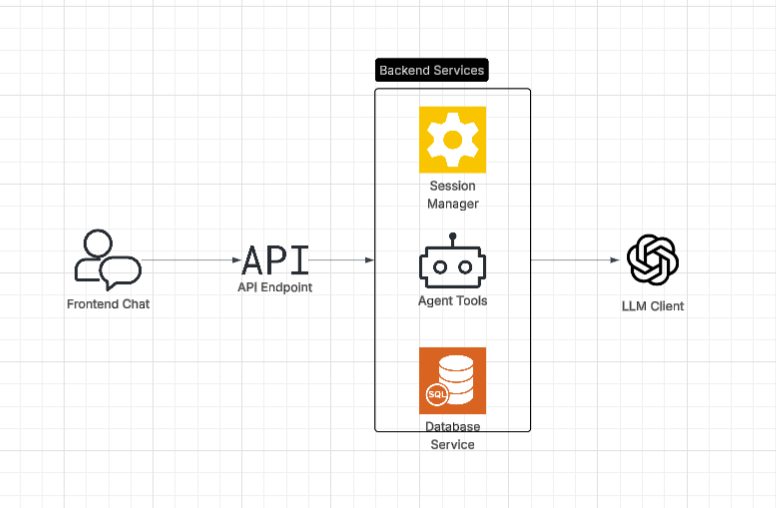 High-level architecture showing the layered design: Frontend → API Layer → Service Layer → AI Layer → Database.
Architecture Layers
- Frontend Layer: Web-based UI for user interactions, session management, and markdown response rendering.
- API Layer: FastAPI application routing requests through REST endpoints, coordinating between services.
- Service Layer: Three core services — Session Manager (user isolation), OEE Query Bot (NLP processing), and Database Service (SQL operations).
- AI Layer: Dual LLM setup with OpenAI GPT-5 as primary and local Ollama as fallback for reliability.
Dual-Mode Architecture
The system supports two operational modes configured via ENABLE_AGENT_MODE:
Pipeline Mode (Traditional)
User Query → Classify Intent → Parse to Spec → Execute Query → Summarize → Response
The developer defines the workflow. Intent classification determines the path: query, explanation, or out_of_scope. Rigid, predictable, and fast.
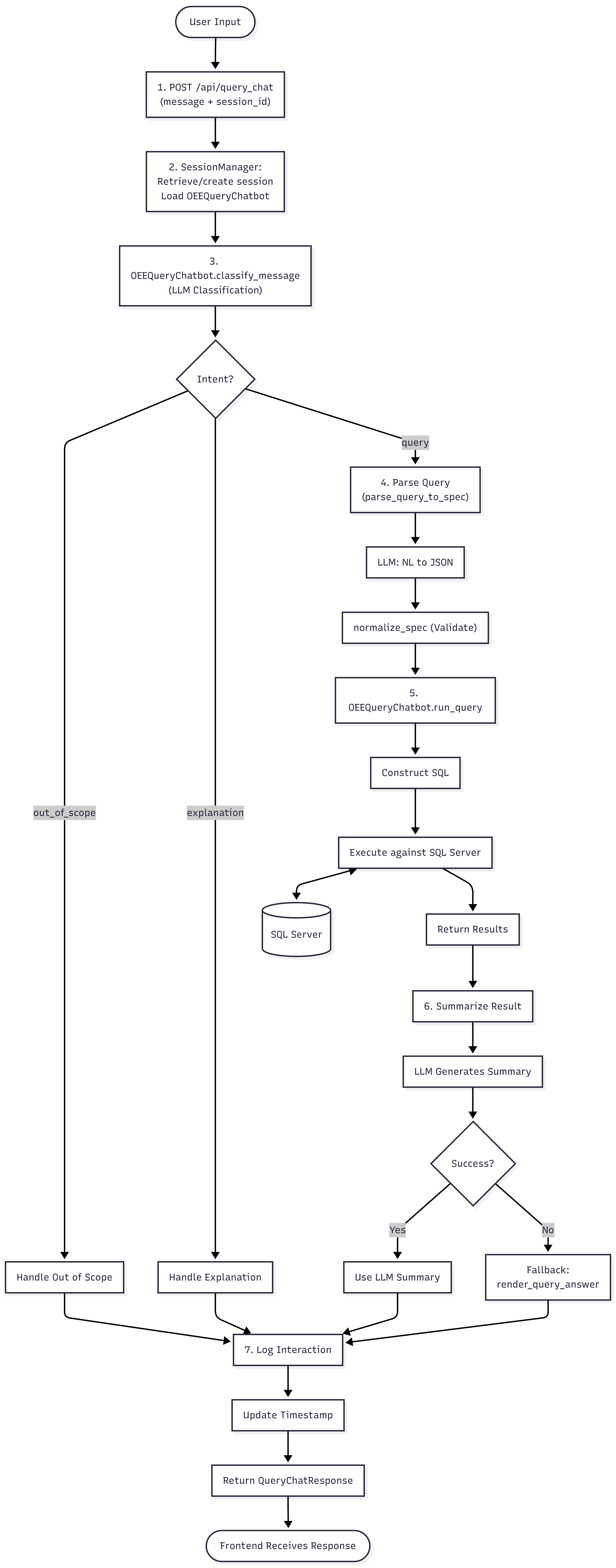 Step-by-step flow for Pipeline mode: from user input through intent classification, NL-to-JSON spec parsing, SQL execution, and LLM-generated summary.
Agent Mode (Autonomous)
User Query → Agent Reasoning → [Dynamic SQL Exploration & Tool Execution] → Synthesis → Response
The LLM autonomously writes and executes SQL queries against any table in the database, decides which tools to call, retries on errors, and generates visualizations dynamically from query results.
 Updated ReAct loop: the agent explores the database schema, writes SQL queries, stores structured results with metadata, then passes them to the visualization engine.
 Earlier agent flow before the SQL agent tools refactor, using predefined OEE-specific tools.
Key Features
AI-Powered Natural Language Processing
- Dual-Mode Architecture: Pipeline mode for guided workflows, Agent mode for autonomous LLM decision-making.
- Autonomous Agent System: LangChain + LangGraph ReAct pattern for intelligent multi-step tool usage.
- Smart Fallback: Primary OpenAI GPT-5 integration with local Ollama fallback.
- Advanced Reasoning: Supports GPT-5 reasoning models with token optimization.
- Memory Management:
SummarizationMiddlewareprevents token overflow by auto-summarizing at 75% context capacity.
Session-Based Multi-User Support
- Isolated Sessions: Each user gets private conversation context and chatbot instance.
- Automatic Cleanup: Sessions expire after 30 minutes of inactivity.
- Concurrent Users: Thread-safe session management handles multiple users simultaneously without data leakage.
Dynamic Data Visualization
- Dynamic SQL Result Processing: Works with any SQL query result — not limited to predefined schemas.
- Smart Chart Selection: Auto-detects data characteristics (date, numeric, categorical columns) to choose optimal chart types.
- Optimized Output: Generates 1–3 most relevant charts (line, bar, pie) per query without redundant duplicates.
- Proper Column Names: Uses actual SQL column names from query metadata for accurate chart labeling.
- Cost Efficient: Single visualization call per query to minimize LLM token usage.
Enterprise-Grade Security & Reliability
- Read-Only SQL Access: Agent tools restricted to
SELECTqueries — no write operations allowed. - Output Truncation: SQL results truncated at 100KB to prevent token overflow.
- Comprehensive Logging: Full audit trail with token usage tracking via LangSmith.
- Health Monitoring: Real-time system health and dependency status endpoint.
- Error Resilience: Graceful failure handling with informative user-facing responses.
Technology Stack
| Layer | Technology | Purpose |
|---|---|---|
| Backend Framework | FastAPI + Uvicorn | High-performance async REST API |
| AI / LLM | OpenAI GPT-5 + Ollama | Natural language processing & reasoning |
| Agent Framework | LangChain + LangGraph | Autonomous agent system with memory |
| Database | SQL Server + SQLAlchemy | OEE and manufacturing data storage |
| Data Processing | Pandas | Data manipulation and analysis |
| Validation | Pydantic | Request/response validation |
| Monitoring | LangSmith | LLM call observability |
| Configuration | python-dotenv | Environment management |
Agent Tools
The Agent mode was refactored from hardcoded OEE-specific tools to SQL agent tools for full database flexibility:
| Tool | Purpose |
|---|---|
sql_db_list_tables | List all available tables in the SQL Server database |
sql_db_schema | Get table schema, column types, and sample rows |
sql_db_query | Execute SELECT queries and store structured results with column metadata |
sql_db_query_checker | LLM-assisted SQL validation and optimization before execution |
generate_visualization() | Create dynamic charts from the last stored SQL query result |
Key upgrade: The agent can now query any table and column dynamically. The sql_db_query tool stores structured data ({data, metadata: {column_names, query, row_count}}) so the visualization engine always has access to proper column names.
Previous tools (now replaced by SQL tools):
query_oee_metrics(),calculate_reliability_metrics(),query_operator_activity(),query_downtime_details(),get_available_machines(),get_available_shifts()— all now handled viasql_db_query.
Pipeline vs Agent Mode Comparison
| Pipeline Mode | Agent Mode | |
|---|---|---|
| Tool usage | Fixed workflow (classify → parse → query → summarize) | LLM autonomously decides tools and order |
| Query flexibility | Predefined intents (oee, availability, performance, etc.) | Dynamic SQL — can query any table/column |
| Visualization | Predefined chart specs | Dynamic charts generated from SQL result metadata |
| Complexity | Predictable, fast | Handles complex multi-step queries with retry |
| Use case | Standard OEE reports | Ad-hoc analysis, custom queries |
Conclusion
The OMC Production Assistant Bot demonstrates a production-ready conversational AI system for manufacturing analytics. The latest refactor to SQL agent tools makes the Agent mode truly dynamic — it can explore the full database schema, write its own queries, and generate accurate visualizations from any result set. Combined with LangChain's ReAct reasoning, a secure FastAPI backend, and robust multi-user session management, the system makes manufacturing data accessible to every user regardless of technical background.